


Liverpool City Council
Driving Licence Application Document Upload Guide
Before uploading images of your documents
Please ensure you have all of the documents that are listed in your email with you before you enter the form. You will need to have clear copies of these documents available digitally. This can be done through scanning the documents, or simply by taking CLEAR photos of the documents on your phone.
Once you have clear images of all the required listed documents, you can now proceed to upload these, on either a desktop, laptop or smartphone (e.g. iPhone or Samsung).
Uploading images of your documents video guide
We have put all the steps into the below video. You can also find the written instructions below.
Instructions
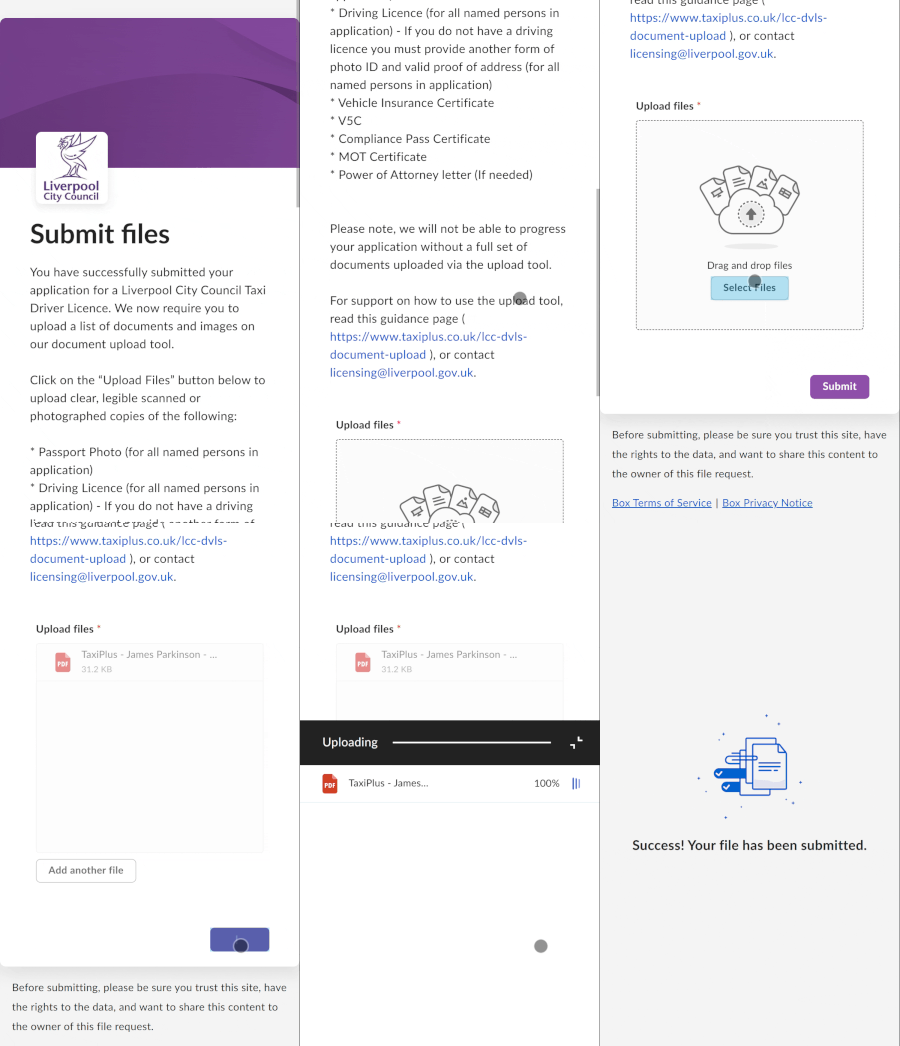
Once you have clicked on the link from your email, you will be taken to Box.com. To upload these documents, scroll down and click ‘Select files’.
You will then be able to choose from your library to find the files required.
Here I have selected all the files I wanted to upload, and then clicked ‘Submit’ when I have finished selecting them.
You will then see the files upload.
Once the uploading has complete, the page will indicate that you have submitted your documents. You can now close your browser.
If you need to upload documents at a later date, you can revisit the “Upload Files” button on the email to add more documents to your application.
You have now completed the uploading of your documents.